
Flow Cytometry Histograms: Single‑Parameter (Univariate) Analysis
Author: Mike Blundell | Reviewer: Chloe Fenton
What Is a Single‑Parameter (Univariate) Histogram?
Single‑parameter or univariate histograms are histograms that display a single measurement parameter (relative fluorescence or light scatter intensity) on the x-axis and the number of events (cell count) on the y-axis. The data is expressed in a histogram, which can be all the data collected or a selected (gated) population. While simple, it is useful for evaluating the total number of cells in a sample that possess the selected physical properties or express the marker of interest.
What Is the Positive Dataset?
Cells with the desired characteristics are called the positive dataset. An example can be seen in Figure 15. Peripheral blood was stained for CD3 and then gated on lymphocytes using forward and side scatter. There are two peaks that can be interpreted as the positive and negative dataset. In this example, the CD3-positive T cells represent around 61% of the cells within the lymphocyte gate.
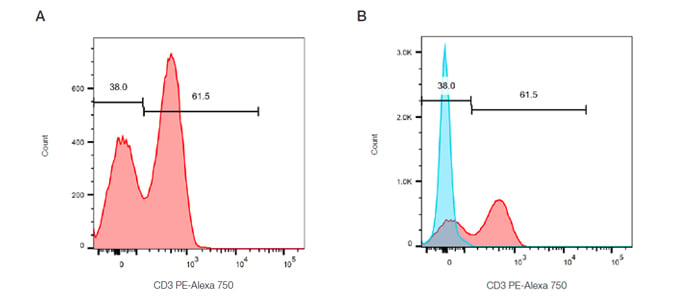
Fig. 15. Single-parameter histograms. A. Cells within the lymphocyte gate defined in Figure 13A are represented in a histogram to evaluate the relative expression of CD3 (MCA463P750).
B. Overlay of a control population onto the stained population allows easy identification of the positive cells.
Gaining Accuracy
In order to accurately identify the positive dataset, flow cytometry should be repeated in the presence of appropriate controls, discussed in a later chapter. This is particularly necessary if a single distinct peak is observed, however often in flow cytometry multiple peaks are observed due to mixed populations. Figure 15B shows a control histogram (in this case an isotype control), in blue, overlaid onto the stained positive dataset, in red, allowing the background staining levels to be accurately defined.
Quantifying Results Using Histogram Statistics
Using analytical software, measurements and statistics can be obtained for many parameters in addition to the number of cells and percentage of cells within the gate. This can include measurements such as median and mean fluorescence intensity (MFI), often used when there are small increases or decreases in fluorescence.
How to Interpret a Single‑Parameter Flow Cytometry Histogram
-
Start with a gated population.
Generate the histogram from a defined population of interest (for example, lymphocytes previously gated using forward and side scatter). -
Plot a single parameter.
Display one measurement parameter on the x‑axis—typically fluorescence intensity of a specific marker or light scatter—and the number of events on the y‑axis. -
Examine the signal distribution.
Assess the shape and position of the histogram. A single peak may be observed in uniform populations, while multiple peaks can indicate mixed cell populations. -
Use an appropriate control to define positive signal.
Overlay a relevant control histogram (such as an isotype control) to define background staining and accurately distinguish the negative and positive datasets. -
Quantify the result.
Determine the percentage of positive cells within the gate and, where appropriate, use statistical measurements such as mean or median fluorescence intensity (MFI) to compare marker expression levels.
Flow Cytometry Basics Guide Download
Get your own copy to peruse at your leisure
Download our updated Flow Cytometry Basics Guide to have practical advice, best practice examples, and a basic overview of all the important flow cytometry principles in one handy location.

Resources
Bio-Rad is committed to helping you succeed in Flow Cytometry by sharing knowledge and best practices from our experts. Below are some extremely useful resources to enhance your journey of discovery and support your success.